Image Guidelines
Tip: In this guide, you will know what image size to prepare before adding products or editing the homepage. Estimated time: 5 minutes.
Image size should be decided before uploading. Many beginners fill products and banners first, then discover images are blurry, cropped, or slow. A better workflow is: check the approximate module size first, then prepare images with a similar ratio.
Use compressed WebP images. Images over 500KB will definitely load slowly and will affect website opening speed.
Product main images, banners, and galleries all depend on image size. Understand ratio and file size first, then edit product pages to avoid rework.
Common Image Sizes
| Image position | Suggested size | File size | Notes |
|---|---|---|---|
| Homepage banner / carousel | Around 1800 x 1000 | Around 300KB or less | Landscape image for the first screen |
| Product main image and gallery | 800 x 800 or 1000 x 1000 | Around 300KB or less each | Use square images and keep the same ratio for one product |
| Post cover image | 1200 x 700 | Around 300KB or less | Landscape image for post listings and the top of a post |
| Product and post detail images | Width no more than 1500; recommended 1500 x 1000 or 1500 x 600 | Around 300KB or less each | Choose a landscape ratio for the content and keep a consistent width within one detail page |
| Logo | Width under 350px | Around 100KB or less | Transparent PNG is common |
| Icon / Favicon | 512 x 512 | Around 100KB or less | Square image |
If an image is larger than the recommended file size, use this image compression and format conversion tool:
https://imagestool.com/zh_CN/compress-images
Compress or convert the image before uploading it to AllinCMS admin.
For example, the screenshot shows a banner module around 1825 x 1000. An image at 1800 x 1000 works well. It does not need to match exactly; a similar ratio is enough.
Use Square Images for Product Main Images and Galleries
Use 800 x 800px or 1000 x 1000px square images for product main images and galleries. Do not mix different image ratios within the same product. Place the main product in the center of the canvas. The product itself should usually take about 70% to 80% of the image area, with even whitespace around it.
Do not place important product details near the edges, because frontend cropping may cut them off. In short: center the product, keep safe whitespace, and avoid edge-to-edge products.

How to Check Module Size
If you do not know the size of a module, use this simple method:
- Maximize the browser window.
- Open the frontend page or designer preview.
- Use a screenshot tool to select the module.
- Read the width and height shown by the screenshot tool.
- Prepare images using that ratio.
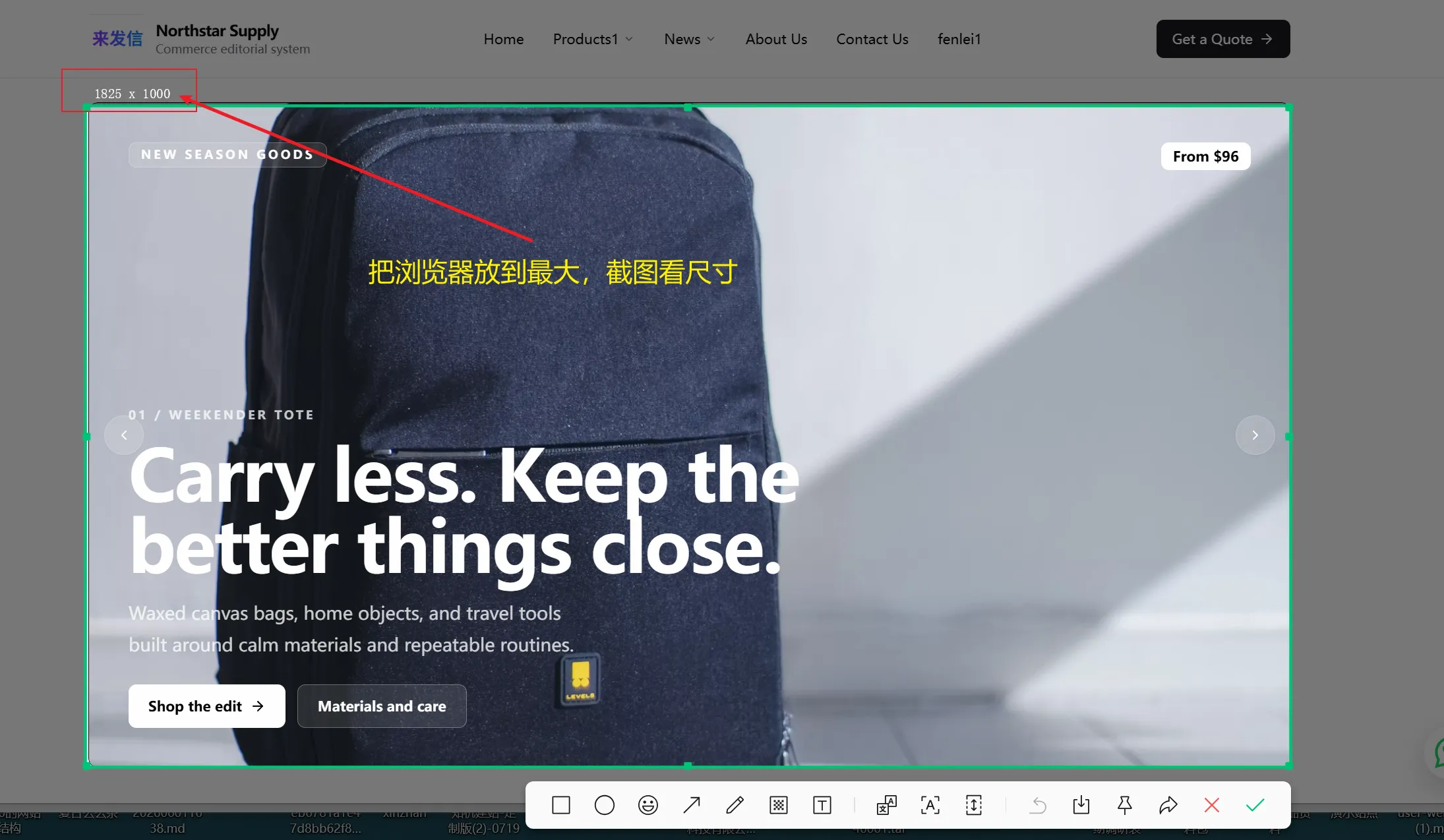
The banner above is about 1825 x 1000, so you can prepare:
1800 x 1000
Close ratios also work:
1600 x 900
1920 x 1080
1800 x 1000
Decide by Use
Compress Before Uploading
Slow sites are often caused by oversized images. Compress homepage banners, product images, post covers, and detail images before uploading.
Compression tool:
https://imagestool.com/zh_CN/compress-images
Recommended:
- Convert large JPG / PNG images to WebP first.
- Keep one banner around 300KB or less.
- Keep each product image, gallery image, post cover, and detail image around 300KB or less.
- Do not upload original phone photos directly. They are usually too large.
If Images Are Cropped
If an image is cropped after upload, do not keep replacing images immediately. First check the module image display mode.
Common fixes:
| Problem | Fix |
|---|---|
| Product image is cropped | Set image display to Fit inside in module properties |
| Banner text is hard to read | Keep image mask or use a cleaner image |
| Gallery images look uneven | Use the same ratio before uploading |
| Image is blurry | Source image is too small; use a clearer image |

More fixes: Image Display Issues.
Add Image Descriptions
When uploading images, add useful descriptions. Do not write "image 1"; describe what is in the image.
Example:
Black wireless earbuds with charging case on white background
This helps SEO and accessibility.
Pitfalls
| Mistake | Result | How to avoid it |
|---|---|---|
| 🟡 Uploading without knowing size | Images may crop or distort | Screenshot the module ratio first |
| 🟡 Image too large | Homepage loads slowly | Compress before upload |
| 🟡 Product ratios vary | Product list looks messy | Use square product main images |
| 🔴 Banner text unreadable | First screen performs poorly | Keep mask or change image |
| 🟡 Alt says "image 1" | Weak SEO signal | Describe image content |
Next
Add Products - after preparing image sizes, upload product images and galleries.
Image Display Issues - read this when images are cropped.